
Features
A closer look at the handshake, the verification checks, and the tools built around them.
The Handshake — Step by Step
The IRLid handshake is a three-step protocol that produces a cryptographic receipt in about ten seconds. Each step diagram below shows what happens on each phone and what data is exchanged.
Show Your HELLO QR
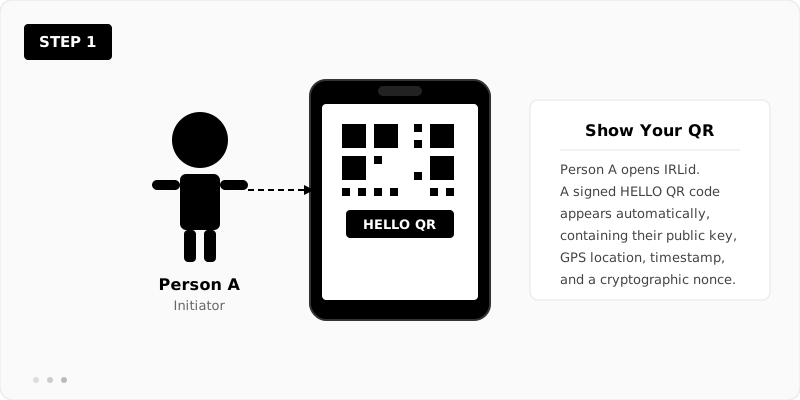
Person A (the Initiator) opens IRLid on their phone. The app automatically generates a signed HELLO QR code and displays it full-screen. This QR encodes a compact JSON payload containing the device's ECDSA P-256 public key, the current GPS coordinates (rounded to ~1.1m precision), a Unix timestamp, and a random nonce.
The entire payload is signed with the device's private key, which means the QR itself is a self-contained cryptographic assertion: "I am the holder of this key, and I was at this location at this time."
Scan & Accept
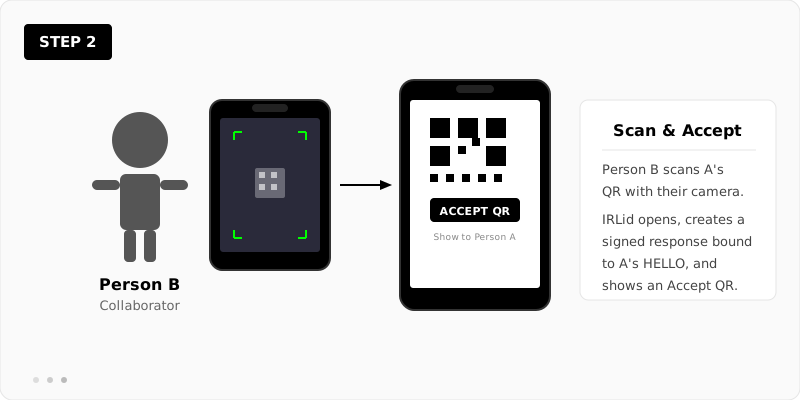
Person B (the Collaborator) scans A's QR code using their phone's standard camera — no app switch needed. The QR links to the IRLid Accept page, which decodes A's HELLO, verifies the signature and timestamp, then creates a signed response.
The response is cryptographically bound to A's specific HELLO via a SHA-256 hash. This binding is critical: it means B's response cannot be replayed against a different HELLO from a different person or time. B's phone displays the Accept QR and waits.
Verify & Receipt
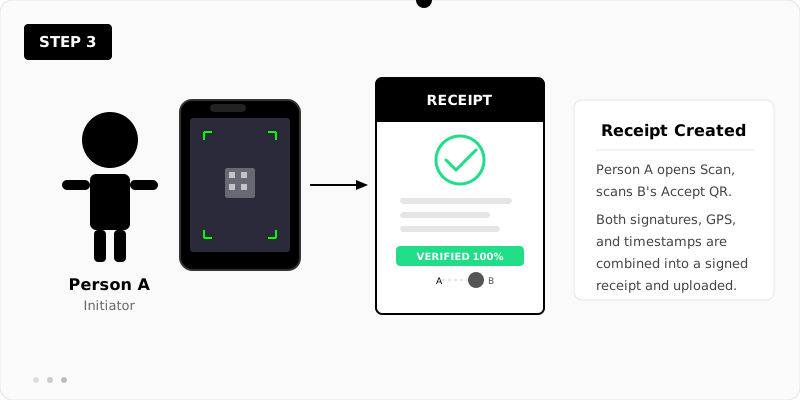
Person A opens the Scan page and points their camera at B's Accept QR. The app decodes B's response and runs a full verification suite: it checks B's signature, confirms the HELLO binding hash matches, validates that both timestamps are within 90 seconds of each other, and measures the GPS distance between both devices (must be within 12 metres).
If all checks pass, the two signed payloads are combined into a single receipt object. This receipt is uploaded to the IRLid server and becomes available to both parties. Anyone with the receipt hash can independently re-run every cryptographic check on the Check page.
Verification Checks
Each receipt is scored against a series of independent checks. The receipt page and Check page display a percentage bar that reflects how many checks passed. Here is the full breakdown:
-
Initiator structure — The initiator's response contains all required fields: payload, hash, signature, and public key.
-
Initiator hash — The SHA-256 hash of the initiator's payload matches the hash field. This confirms the payload hasn't been tampered with.
-
Initiator signature — The ECDSA signature over the hash verifies against the initiator's public key.
-
Collaborator structure — Same structural check for the collaborator's response.
-
Collaborator hash — The collaborator's payload hash is independently recomputed and matched.
-
Collaborator signature — The collaborator's ECDSA signature is verified against their public key.
-
HELLO binding — Both responses contain a hash that matches the original HELLO, proving they were created for this specific handshake.
-
Time delta — The difference between both timestamps is within the 90-second tolerance window.
-
Distance — The GPS coordinates reported by both devices are within 12 metres of each other. This confirms the two devices agreed on location — not the accuracy of the GPS source, which is self-reported.
Platform Features
No App Required
IRLid runs entirely in the browser. No download, no install, no app store. Works on any phone with a camera and a modern browser.
Device Key Pairs
Each browser generates a unique ECDSA P-256 key pair using the Web Crypto API. The private key never leaves the device. By default it lives in localStorage; with v5 hardware-backed signing enabled in Settings (LIVE since May 2026), the key lives in the device's Secure Enclave (Apple), Trusted Execution Environment (Android), or Windows Hello TPM via WebAuthn — non-extractable even on rooted devices, and requires a live device unlock (Face ID, fingerprint, or passcode) at every signature.
Google Account Linking
Optionally link a Google account to attach your name and profile picture to receipts. Multiple devices can be linked to one account via a 6-digit code.
Receipt History
All your receipts are stored server-side and accessible from your account page. Receipts are visible to both parties — if your key was involved, the receipt appears in your list.
Third-Party Verification
Anyone can verify a receipt on the Check page by pasting a receipt hash or URL. All cryptographic checks run in the browser — no login required, no trust in the server needed.
Compressed QR Codes
Payloads are deflate-compressed before encoding into QR codes. This keeps QR codes scannable even with the full cryptographic data (public keys, signatures, GPS, timestamps).
Hardware-Backed Signing
Three optional trust enhancements layered on the base protocol — all off by default, user-enabled in Settings, never prompted during a scan:
Device-unlock gate (v4, LIVE since April 2026). WebAuthn requires a live device unlock — Face ID, Touch ID, fingerprint, or passcode — at each handshake. The verified flag is committed inside the ECDSA-signed payload — evidence that the receipt was signed on this device by someone who could unlock it at that moment, not copied, automated, or replayed. It deliberately doesn't claim which person or which unlock method; identifying the person is a separate layer (co-presence and trust history). No biometric data leaves the device.
Hardware-backed signing (v5, LIVE since May 2026). Signing keys live in the device's Secure Enclave (Apple), TEE (Android), or Windows Hello TPM. Non-extractable even on rooted devices. Score band 70/100. Closes the strongest honest criticism of v3/v4 (localStorage extraction).
Mutual face capture (v5.x, planned). At each scan step the camera optionally captures the other party's face alongside their QR. A witnesses B's face; B witnesses A's face. Only the photo hash travels in the receipt — the photo stays on device.
Open Source
The full codebase — frontend, Cloudflare Worker backend, D1 database schema — is on GitHub. Audit the crypto, run your own instance, or contribute.
Embeddable Widget
Any website can embed IRLid receipt verification in a single <iframe>. A postMessage API signals pass or fail to the parent page — no SDK, no server changes needed. See the demo →
Security Model
IRLid's security comes from layering independent constraints. A valid receipt requires correct ECDSA signatures from two distinct key pairs, hash bindings that chain the responses to a specific HELLO, timestamps within a tight window, and GPS proximity. An attacker would need to simultaneously control two devices at the same time and location while also possessing the private keys — which is equivalent to actually being there.
The server never sees private keys. It stores only the combined receipt JSON (which contains only public keys and signed data) and optional profile information. The server performs its own verification at upload time, but this is a convenience check — the receipt is self-verifying and can be validated by anyone with the raw JSON.
Roadmap
IRLid is designed to grow in layers — each adding new trust primitives while keeping everything backwards compatible and optional. The base receipt scores 20/100 and remains valid forever. v4 enhancements — trust history, device-unlock gate, privacy mode — push the ceiling to 50/100 when enabled in Settings. v5 hardware-backed signing pushes it to 70/100 when active. Every layer is optional and off by default; the base receipt is sufficient for everyday use.
Planned: mutual face capture as a witness system (v5.x), multi-witness time anchoring against atomic clocks (v6), a trust graph built from real-world relationships (v6), drone delivery and IoT verification (v6+), and zero-knowledge proofs for privacy-preserving presence (v7).
Full roadmap — layer by layer → Verification score breakdown → Live widget demo →